244 lines
14 KiB
Markdown
244 lines
14 KiB
Markdown
# sitespeed.io
|
||
|
||
[](https://github.com/sitespeedio/sitespeed.io/actions/workflows/unittests.yml)
|
||
[](https://github.com/sitespeedio/sitespeed.io/actions/workflows/linux.yml)
|
||
[](https://github.com/sitespeedio/sitespeed.io/actions/workflows/docker.yml)
|
||
[](https://github.com/sitespeedio/sitespeed.io/actions/workflows/docker-scan.yml)
|
||
[](https://github.com/sitespeedio/sitespeed.io/actions/workflows/windows.yml)
|
||
[](https://github.com/sitespeedio/sitespeed.io/actions/workflows/safari.yml)
|
||
[](https://github.com/sitespeedio/sitespeed.io/actions/workflows/upload.yml)
|
||
[![Downloads][downloads-image]][downloads-url]
|
||
[![Docker][docker-image]][docker-url]
|
||
[![Stars][stars-image]][stars-url]
|
||
[![npm][npm-image]][npm-url]
|
||
[![Changelog #212][changelog-image]][changelog-url]
|
||
|
||
|
||
[Website](https://www.sitespeed.io/) | [Documentation](https://www.sitespeed.io/documentation/sitespeed.io/) | [Changelog](https://github.com/sitespeedio/sitespeed.io/blob/main/CHANGELOG.md) | [Bluesky](https://bsky.app/profile/sitespeed.io) | [Mastodon](https://fosstodon.org/@sitespeedio)
|
||
|
||
|
||
|
||
# Table of Contents
|
||
- [Welcome to the Wonderful World of Web Performance](#welcome-to-the-wonderful-world-of-web-performance)
|
||
- [What is sitespeed.io?](#what-is-sitespeedio)
|
||
- [Why Choose sitespeed.io?](#why-choose-sitespeedio)
|
||
- [Dive Into Our Documentation](#dive-into-our-documentation)
|
||
- [Installation](#installation)
|
||
- [Docker](#docker)
|
||
- [NodeJS](#nodejs)
|
||
- [Usage](#usage)
|
||
- [Basic Usage](#basic-usage)
|
||
- [Advanced Configuration](#advanced-configuration)
|
||
- [Mobile Performance Testing](#mobile-performance-testing)
|
||
- [Examples](#examples)
|
||
- [Contributing](#contributing)
|
||
- [Reporting Issues](#reporting-issues)
|
||
- [Community and Support](#community-and-support)
|
||
- [License](#license)
|
||
|
||
|
||
|
||
# Welcome to the wonderful world of web performance!
|
||
|
||
Welcome to `sitespeed.io`, the comprehensive web performance tool designed for everyone passionate about web speed. Whether you're a developer, a site owner, or just someone curious about website performance, `sitespeed.io` offers a powerful yet user-friendly way to analyze and optimize your website.
|
||
|
||
## What is sitespeed.io?
|
||
|
||
`sitespeed.io` is more than just a tool; it's a complete solution for measuring, monitoring, and improving your website's performance. Built with simplicity and efficiency in mind, it enables you to:
|
||
|
||
- **Test Websites Using Real Browsers**: Simulate real user interactions and conditions to get accurate performance data.
|
||
- **Speed Optimization Feedback**: Get detailed insights into your website's construction and discover opportunities for enhancing speed.
|
||
- **Track Performance Over Time**: Monitor changes and trends in your website's performance to stay ahead of potential issues.
|
||
|
||
Use cases on when to use `sitespeed.io`.
|
||
- **Web performance audit**: Run performance tests from your terminal.
|
||
- **Continuous Integration**: Detect web performance regressions early in the development cycle.
|
||
- **Production Monitoring**: Monitor performance in production and get alerted on regressions.
|
||
|
||
## Why Choose sitespeed.io?
|
||
|
||
- **Open Source and Community-Driven**: Built and maintained by a community, ensuring continuous improvement and innovation.
|
||
- **Versatile and Extensible**: Whether you're running a simple blog or a complex e-commerce site, `sitespeed.io` adapts to your needs.
|
||
- **Seamless Integration**: Easily incorporate `sitespeed.io` into your development workflow, continuous integration systems, and monitoring setups.
|
||
|
||
## Dive Into Our Documentation
|
||
|
||
We've put countless hours into our [documentation](https://www.sitespeed.io/documentation/sitespeed.io/) to help you get the most out of `sitespeed.io`. From installation guides to advanced usage scenarios, our documentation is a treasure trove of information and tips.
|
||
|
||
|
||
# Installation
|
||
|
||
Getting started with `sitespeed.io` is straightforward. You can install it using Docker or NodeJS, depending on your preference and setup. Follow these simple steps to begin optimizing your website's performance.
|
||
|
||
## Docker
|
||
|
||
Using Docker is the easiest way to get started with `sitespeed.io`, especially if you don't want to handle dependencies manually. Run the following command to use `sitespeed.io` in a Docker container:
|
||
|
||
```bash
|
||
docker run --rm -v "$(pwd)":/sitespeed.io sitespeedio/sitespeed.io https://www.sitespeed.io/
|
||
```
|
||
|
||
This command pulls the latest sitespeed.io Docker image and runs a test on the sitespeed.io website. The **-v "$(pwd)":/sitespeed.io** part mounts the current directory into the container, allowing you to easily access test results.
|
||
|
||
## NodeJS
|
||
|
||
If you prefer installing `sitespeed.io` as an npm package, ensure you have NodeJS installed on your system. Then, install `sitespeed.io` globally using npm:
|
||
|
||
```bash
|
||
npm i -g sitespeed.io
|
||
```
|
||
|
||
After installation, you can start using sitespeed.io by running:
|
||
|
||
```bash
|
||
sitespeed.io https://www.example.com
|
||
```
|
||
|
||
Replace https://www.example.com with the URL you wish to test. Note that using NodeJS might require additional dependencies like FFmpeg and Python. Detailed installation instructions for these dependencies can be found [here](https://www.sitespeed.io/documentation/sitespeed.io/installation/).
|
||
|
||
Choose the method that best suits your environment and get ready to dive into web performance optimization with sitespeed.io!
|
||
|
||
# Usage
|
||
|
||
`sitespeed.io` is tailored to be user-friendly, making web performance testing accessible regardless of your technical expertise. Here's a straightforward guide to help you begin your web performance optimization journey.
|
||
|
||
## Basic Usage
|
||
|
||
To start testing your website, simply run `sitespeed.io` with the URL of the site you want to analyze. For example:
|
||
|
||
```bash
|
||
sitespeed.io https://www.example.com --browser chrome -n 5
|
||
```
|
||
|
||
This command tests https://www.example.com using Chrome and performs 5 iterations of the test. This approach helps in obtaining a more accurate median performance measurement by testing the site multiple times.
|
||
|
||
## Advanced Configuration
|
||
|
||
sitespeed.io offers a wide range of configuration options to tailor the tests to your specific needs. You can specify different browsers, adjust connectivity settings, and much more. For a comprehensive list of all available options, visit our [configuration documentation](https://www.sitespeed.io/documentation/sitespeed.io/configuration/).
|
||
|
||
Additionally, for a quick overview of all command-line options, you can run:
|
||
|
||
```bash
|
||
sitespeed.io --help
|
||
```
|
||
|
||
This command displays all the available flags and settings you can use with sitespeed.io, helping you fine-tune your performance testing to fit your unique requirements.
|
||
|
||
Whether you're running a quick check or a detailed analysis, sitespeed.io provides the flexibility and power you need to deeply understand and improve your website's performance.
|
||
|
||
## Mobile Performance Testing
|
||
|
||
In today's mobile-first world, ensuring your website performs optimally on smartphones and tablets is crucial. With `sitespeed.io`, you can simulate and analyze the performance of your website on mobile devices, helping you understand and improve the user experience for mobile audiences.
|
||
|
||
### Why Test on Mobile?
|
||
|
||
- **User Experience**: A significant portion of web traffic comes from mobile devices. Testing on mobile ensures your site is optimized for these users.
|
||
- **Search Engine Ranking**: Search engines like Google prioritize mobile-friendly websites in their search results.
|
||
- **Performance Insights**: Mobile devices have different performance characteristics than desktops, such as CPU limitations and network variability.
|
||
|
||
### How sitespeed.io Helps
|
||
|
||
- **Real Browser Testing**: Simulate mobile browsers to get accurate performance data as experienced by real users.
|
||
- **Device-Specific Metrics**: Gain insights into how your site performs on different mobile devices and networks.
|
||
- **Responsive Design Analysis**: Test how well your site adapts to various screen sizes and orientations.
|
||
|
||
### Getting Started
|
||
|
||
To start testing your website’s mobile performance, you need to setup your mobile phone for testing. We got [documentation for setting up your Android phone](https://www.sitespeed.io/documentation/sitespeed.io/mobile-phones/#test-on-android) and [iOS](https://www.sitespeed.io/documentation/sitespeed.io/mobile-phones/#test-on-ios).
|
||
|
||
When your setup is ready, you can run tests on your Android phone.
|
||
|
||
```bash
|
||
sitespeed.io https://www.example.com --android
|
||
```
|
||
|
||
## Examples
|
||
|
||
`sitespeed.io` provides insightful HTML reports that help you visualize and understand your website's performance. Here are some examples to illustrate what you can achieve:
|
||
|
||
### Summary Report
|
||
|
||
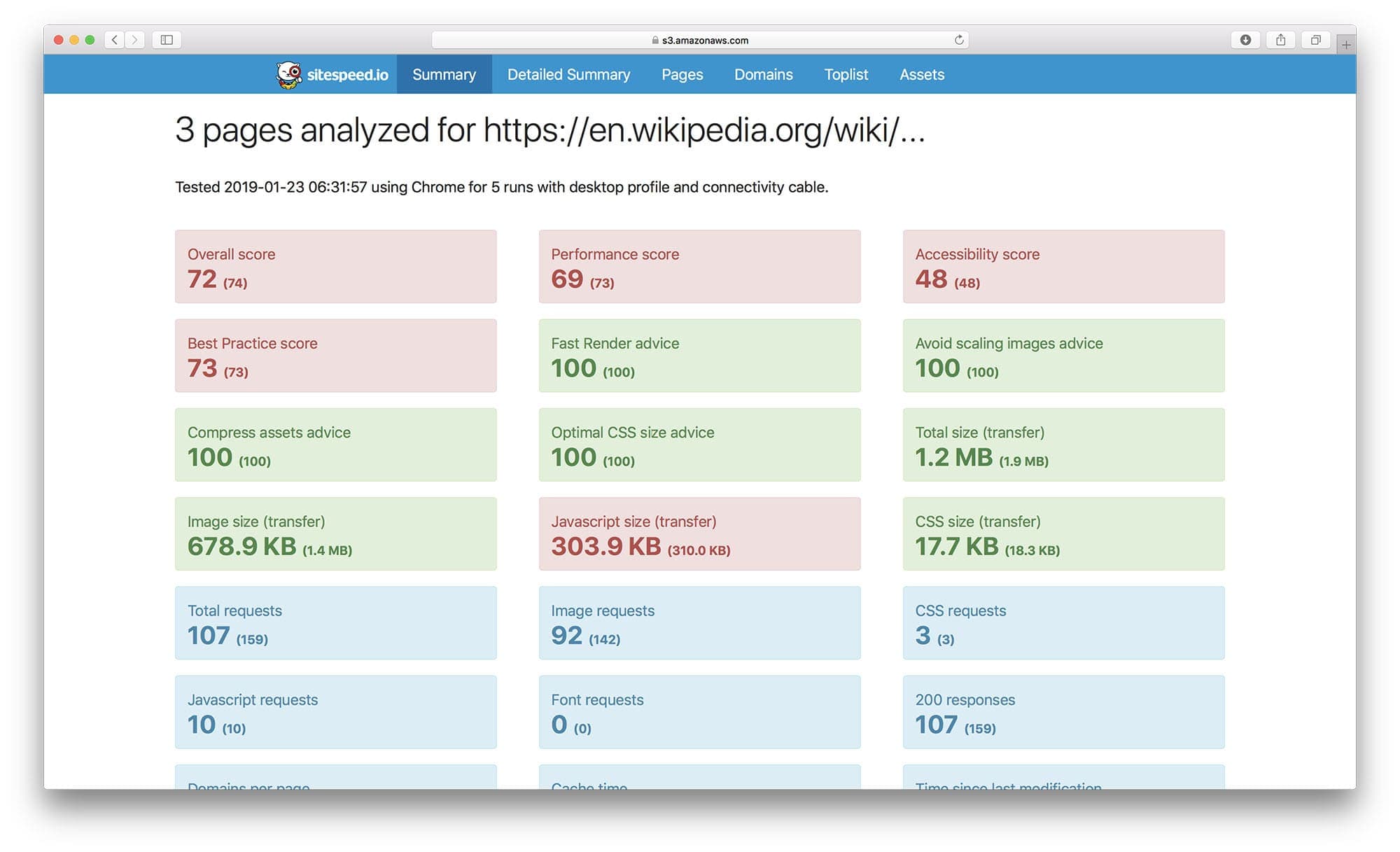
Here's an example of a summary report in HTML, offering a comprehensive overview of your site's performance metrics:
|
||
|
||
|
||
|
||
This report includes key performance indicators like load times, page size, and request counts, giving you a quick snapshot of your site’s overall health.
|
||
|
||
### Individual Page Report
|
||
|
||
For more detailed analysis, here's an individual page report:
|
||
|
||

|
||
|
||
This report dives deeper into a single page's performance, providing metrics on aspects like scripting, rendering, and network activity, crucial for pinpointing specific areas of improvement.
|
||
|
||
### Performance Monitoring Dashboard
|
||
|
||
To monitor your website’s performance over time, check out our live setup at [dashboard.sitespeed.io](https://dashboard.sitespeed.io/), which integrates `sitespeed.io` with Graphite and Grafana.
|
||
|
||
#### Metrics in Graphite/Grafana
|
||
|
||
Collected metrics from a URL visualized in Graphite/Grafana:
|
||
|
||

|
||
|
||
This setup allows for continuous tracking of performance, helping you identify trends and potential issues.
|
||
|
||
#### Trends in Grafana
|
||
|
||
Trends over time in Grafana provide a long-term view of your site's performance:
|
||
|
||

|
||
|
||
With these insights, you can make informed decisions about optimizations and track the impact of changes you make.
|
||
|
||
### Video Performance Analysis
|
||
|
||
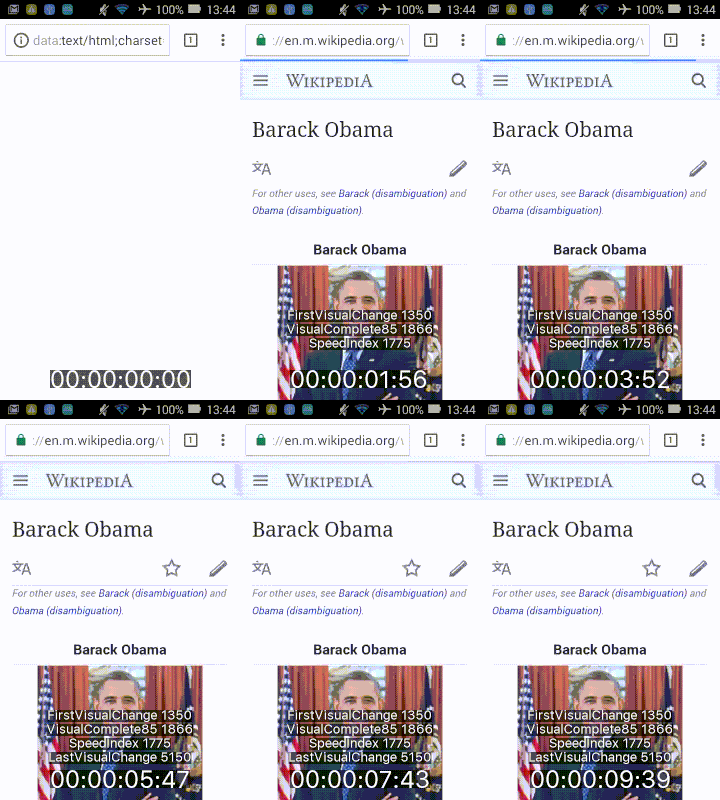
For visual feedback, `sitespeed.io` can generate videos, making it easier to see how your site loads in real-time. Here's a sample video:
|
||
|
||
|
||
|
||
Video analysis is most easily done using Docker and offers a unique perspective on user experience, highlighting areas that need attention.
|
||
|
||
|
||
# Contributing
|
||
|
||
We welcome contributions from the community! Whether you're fixing a bug, adding a feature, or improving documentation, your help is valuable. Here’s how you can contribute:
|
||
|
||
1. **Create an Issue**: Create an issue and discuss with us how to implement the issue.
|
||
2. **Fork and Clone**: Fork the repository and clone it locally.
|
||
3. **Create a Branch**: Create a new branch for your feature or bug fix.
|
||
4. **Develop**: Make your changes. Ensure you adhere to the coding standards and write tests if applicable.
|
||
5. **Test**: Run tests to ensure everything works as expected.
|
||
6. **Submit a Pull Request**: Push your changes to your fork and submit a pull request to the main repository.
|
||
|
||
Before contributing, please read our [CONTRIBUTING.md](.github/CONTRIBUTING.md) for more detailed information on how to contribute.
|
||
|
||
# Reporting Issues
|
||
Found a bug or have a feature request? Please use the [GitHub Issues](https://github.com/sitespeedio/sitespeed.io/issues) to report them. Be sure to check existing issues to avoid duplicates.
|
||
|
||
# Community and Support
|
||
|
||
Join our community! Whether you need help, want to share your experience, or discuss potential improvements, there are several ways to get involved:
|
||
|
||
- **Slack**: Connect with fellow users and the development team on [Slack](https://join.slack.com/t/sitespeedio/shared_invite/zt-296jzr7qs-d6DId2KpEnMPJSQ8_R~WFw).
|
||
- **GitHub Issues**: For technical questions, feature requests, and bug reports, use our [GitHub issues](https://github.com/sitespeedio/sitespeed.io/issues).
|
||
- **RSS/Changelog**: Latest releases and information can always be found in our [RSS feed](https://github.com/sitespeedio/sitespeed.io/releases.atom) and in our [changelog](https://github.com/sitespeedio/sitespeed.io/blob/main/CHANGELOG.md).
|
||
- **Mastodon**: Follow us on Mastodon [https://fosstodon.org/@sitespeedio](https://fosstodon.org/@sitespeedio).
|
||
|
||
We're excited to have you in our community and look forward to your contributions and interactions!
|
||
|
||
# License
|
||
[The MIT License (MIT)](LICENSE).
|
||
|
||
[stars-url]: https://github.com/sitespeedio/sitespeed.io/stargazers
|
||
[stars-image]: https://img.shields.io/github/stars/sitespeedio/sitespeed.io.svg?style=flat-square
|
||
[downloads-image]: https://img.shields.io/npm/dt/sitespeed.io.svg?style=flat-square
|
||
[downloads-url]: https://npmjs.org/package/sitespeed.io
|
||
[docker-image]: https://img.shields.io/docker/pulls/sitespeedio/sitespeed.io.svg
|
||
[docker-url]: https://hub.docker.com/r/sitespeedio/sitespeed.io/
|
||
[changelog-image]: https://img.shields.io/badge/changelog-%23212-lightgrey.svg?style=flat-square
|
||
[changelog-url]: https://changelog.com/212
|
||
[npm-image]: https://img.shields.io/npm/v/sitespeed.io.svg
|
||
[npm-url]: https://npmjs.org/package/sitespeed.io
|